
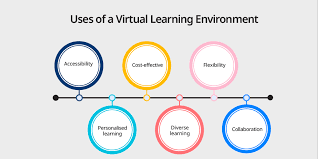
Virtual learning environments (VLEs) are digital spaces where learning and teaching happen online. They offer tools for lessons, discussions, assignments, and tracking progress, making education accessible anywhere, anytime.
What Are Virtual Learning Environments?
Think of a virtual learning environment, or VLE, as your digital classroom. It’s a website or a special app. This is where schools and companies put all their learning stuff.
It’s like a central hub for lessons and talking with others.
VLEs are built to help people learn. They hold course materials. You can find videos, readings, and quizzes here.
They also let students turn in homework. Teachers can grade it right there. It’s all organized in one spot.
These systems are also called Learning Management Systems, or LMS. It’s the same idea. They manage the entire learning process.
This includes signing up for classes and seeing how well you’re doing. It’s a big part of modern education.
Many different kinds of VLEs exist. Some are very simple. Others are packed with fancy features.
They all aim to make learning easier and more flexible. They break down the walls of a traditional classroom.
My First Foray into Online Teaching
I remember my first time trying to teach a workshop online. It was about digital design basics. I was used to face-to-face classes.
I could see my students’ faces. I could read their body language. I knew when they were confused or excited.
Then came the VLE. I had to upload all my slides. I had to figure out how to host a live session.
I felt a knot of anxiety in my stomach. What if no one showed up? What if the tech failed?
It felt like I was shouting into a void.
The first session was awkward. The chat box was quiet. A few people had their cameras off.
I missed the immediate feedback. I felt disconnected. It was a far cry from the energy of a real room.
I felt a bit defeated. I wondered if online teaching could ever really work.
But then, something shifted. A student asked a great question in the discussion forum. Others jumped in to answer.
I saw students helping each other. They were sharing their own design projects. They were giving constructive feedback.
This was the connection I was missing.
Slowly, I learned to use the VLE’s tools better. I found ways to make polls interactive. I created small group breakout rooms for discussions.
I started to see the VLE not as a barrier, but as a bridge. It was a different way to connect, but it was connection nonetheless. This experience taught me that VLEs need careful planning to be effective.
The Core Features of a VLE
Content Delivery: This is where course materials live. Think PDFs, videos, and presentations. VLEs make it easy to organize and access these resources.
Communication Tools: Forums, chat rooms, and messaging systems let students and teachers talk. This builds a sense of community.
Assignment Submission: Students can upload their work easily. Teachers can then grade and provide feedback directly within the system.
Progress Tracking: VLEs often track grades and completion rates. This helps everyone see how they are doing.
Quizzes and Assessments: Online tests can be created and administered through the VLE. Results are often tallied automatically.
Why Are Virtual Learning Environments So Important?
The world is changing fast. We need new ways to learn. VLEs are a big part of this change.
They offer a lot of benefits.
First, they make education flexible. People can learn when and where it works for them. This is great for busy adults.
It also helps students who live far from schools. They don’t have to travel.
VLEs can also be more affordable. Schools might save money on buildings. Students save on travel and housing.
This makes learning available to more people.
These systems allow for personalized learning. Teachers can give different materials to different students. They can track who needs extra help.
This means everyone can learn at their own pace. It’s a more tailored approach.
VLEs also help develop digital skills. Using these platforms teaches students how to navigate online tools. This is a crucial skill in today’s job market.
They learn about digital communication and organization.
For teachers, VLEs streamline tasks. Grading papers can be time-consuming. VLEs often automate some grading.
This frees up teachers to focus on teaching. They can also communicate with many students at once.
Think about large companies. They use VLEs for training. New employees can learn company policies online.
Existing employees can learn new skills. This saves money and time on in-person training sessions.
The virtual learning environments also provide a record. All coursework and grades are kept. This is helpful for students to review their progress.
It’s also good for schools to track student success over time. It creates a digital learning history.
Real-World Impact: Access and Equity
Increased Access: Geographical barriers disappear. Anyone with an internet connection can access courses.
Flexibility for All: Working professionals, parents, and individuals with disabilities benefit from learning on their own schedule.
Resource Richness: VLEs can host a vast array of multimedia resources, catering to different learning styles.
Cost-Effectiveness: Reduced overhead for institutions and lower expenses for students can make education more attainable.
Types of Virtual Learning Environments
Not all VLEs are the same. They come in different shapes and sizes. Each one is built for a slightly different purpose or audience.
Understanding these differences can help you pick the right one.
First, there are the big, all-in-one systems. Think of Blackboard or Canvas. These are used by many universities and large school districts.
They have tons of features. They can handle thousands of students. They are often very customizable.
Then, there are simpler platforms. Moodle is a popular open-source option. It’s free to use.
It can be adapted by schools or individuals. It’s powerful but might require more technical skill to set up.
Some VLEs are designed for specific types of learning. For example, some focus heavily on corporate training. They might have modules for compliance or skill development.
They track employee progress very closely.
There are also newer, more dynamic VLEs. These often use more engaging interfaces. They might incorporate gamification.
They try to make learning feel less like work and more like play.
Some companies build their own internal VLEs. This is common for very large organizations. They can tailor the system precisely to their needs.
This gives them full control over the learning experience.
Finally, many VLEs can connect with other tools. They might integrate with video conferencing software. They might link to digital libraries or student information systems.
This makes them part of a larger educational ecosystem.
The choice of VLE often depends on budget, technical resources, and the learning goals. A small art studio might need a different VLE than a large research university. The core idea is the same: a digital space for learning.
VLE Style Snapshot
University-Grade: Feature-rich, scalable (e.g., Canvas, Blackboard).
Open-Source: Customizable, often free (e.g., Moodle).
Corporate Focus: Designed for employee training and compliance.
Modern & Engaging: Emphasize user experience and interactivity.
Integrated Suites: Connect with other educational technologies.
How Does a Virtual Learning Environment Work in Practice?
Let’s walk through a typical day in a VLE. Imagine you’re a student taking an online history class. You log in using your username and password.
The first thing you see is your dashboard. It shows all your courses. It might also highlight upcoming assignments or messages.
You click on your history course link.
Inside the course, you see different sections. There’s usually a “Syllabus” or “Course Outline” section. This tells you what you’ll be learning and how you’ll be graded.
You can download it for reference.
Then, there’s the “Content” or “Modules” section. Here, your professor has organized the learning material week by week. This week’s topic is the American Revolution.
You find a series of videos to watch.
There are also readings. These are usually PDFs or links to online articles. You can click and read them directly in your browser.
The VLE makes sure you have everything in one place.
You might also see a “Discussion Forum” for this week’s topic. Your professor might ask a question. You can type your thoughts.
Other students can reply to you. You can read their ideas too. This is where you interact and learn from each other.
Later, you need to submit your essay. You go to the “Assignments” section. You click on the essay title.
You upload your document. You might get a confirmation message that it was sent. The VLE records the submission time.
You can check your grades anytime. There’s a “Grades” section. You can see how you did on past quizzes and assignments.
This helps you understand where you stand.
If you have a question for your professor, you can use the “Messaging” tool. Or you might post in the “Q&A” forum. The VLE makes communication structured.
This is the core flow. It’s about accessing information, engaging with content, interacting with peers and instructors, and submitting your work. The virtual learning environments are designed to guide you through this process smoothly.
Personal Experience: The Frustration of a Clunky Interface
I was helping my niece set up her college courses online. She’s bright and tech-savvy, but the university’s chosen VLE was a nightmare. It was an older system, and it felt like it.
Loading times were slow. Buttons were hidden in confusing menus. Finding basic information felt like a treasure hunt.
She had to submit a lab report. The submission portal was buried three clicks deep. Then, it only accepted files in a very specific format.
If you uploaded the wrong type, it just gave an error message. No explanation, just a generic “failed upload.”
She spent nearly an hour just trying to get her report submitted. She was getting visibly frustrated. I saw the panic in her eyes.
She thought she was doing something wrong. But it was the system itself that was the problem.
We finally got it to work. But the whole experience was draining. It took away from the excitement of starting college.
It made her feel incompetent before she even began. This is the opposite of what a VLE should do. It should empower, not frustrate.
That day, I really understood how important good design is. A VLE isn’t just a tool; it’s the student’s gateway to their education. If that gateway is difficult to open, the whole experience suffers.
It showed me that even with great content, a bad interface can ruin learning.
Quick Scan: VLE User Experience Checklist
Intuitive Navigation: Can users find what they need easily?
Fast Loading Times: Does the system respond quickly?
Clear Instructions: Are tasks and submission processes explained well?
Mobile-Friendly: Does it work well on phones and tablets?
Accessibility Features: Can users with disabilities navigate it?
Designing for Effective Virtual Learning
Creating a great online learning experience isn’t just about picking a VLE. It’s about how you use it. Teachers and course designers play a huge role.
One key is clear organization. Content should be logically structured. Use headings and subheadings.
Make it easy for students to follow the path. Avoid long, dense blocks of text. Break things up.
Engagement is vital. Don’t just post readings and ask for essays. Use interactive elements.
Create quizzes that give instant feedback. Use discussion forums to spark conversations. Pose thought-provoking questions.
Visual appeal matters too. Use images and graphics where appropriate. Keep the design clean and uncluttered.
A visually pleasing space is more inviting.
Accessibility is non-negotiable. Ensure all materials can be accessed by everyone. Use alt text for images.
Provide transcripts for videos. This makes sure no one is left behind.
Feedback loops are critical. Teachers need to respond to student questions and submissions promptly. Students need to know how they are doing.
The VLE should facilitate this feedback.
Finally, foster a sense of community. Online learning can feel isolating. Use discussion boards and group activities.
Encourage peer-to-peer learning. Make students feel connected to their classmates and instructors.
The best virtual learning environments are not just digital repositories. They are active spaces for growth, interaction, and discovery. They require thoughtful design and constant attention from educators.
Myth vs. Reality: VLE Effectiveness
Myth: VLEs are just digital textbooks.
Reality: Effective VLEs are dynamic spaces for interaction, collaboration, and personalized learning.
Myth: Online learning is easier than in-person learning.
Reality: Online learning requires strong self-discipline, time management, and digital literacy skills.
Myth: Any VLE will work just fine.
Reality: The platform’s design, features, and how it’s used significantly impact learning outcomes.
What Does This Mean for You?
If you’re a student, embrace the VLE. Learn its features. Understand how to navigate it.
Don’t be afraid to ask your instructor for help if you’re confused. Your success is partly linked to how well you use the tools.
If you’re an educator, invest time in learning your VLE. Experiment with its features. Think about how you can make your course more engaging online.
Seek training and resources. Your efforts will pay off in student success.
If you’re an administrator, choose your VLE wisely. Consider user feedback. Prioritize systems that are easy to use and support diverse learning needs.
Adequate training for both staff and students is key.
For parents, understand that your child might be using a VLE. Ask them about it. Offer support.
Help them develop good study habits for online learning. This is a growing part of education.
Ultimately, the effectiveness of a virtual learning environment depends on the people using it. It’s a tool, and like any tool, it’s how you wield it that matters. The goal is always to enhance learning, not hinder it.
Quick Fixes for VLE Hiccups
Can’t find a file? Check the course syllabus or contact your instructor via the VLE message system.
Assignment won’t upload? Ensure your file is in an accepted format. Check file size limits. Try a different browser.
Discussion board confusing? Read any pinned instructions carefully. See if there’s a “Help” forum.
Technical issue? Look for a “Help Desk” or “Support” link within the VLE. Many systems have built-in tech support.
Quick Tips for Navigating VLEs
Get familiar with your VLE early on. Don’t wait until an assignment is due. Explore all the sections.
See where everything is located.
Use your calendar! VLEs often integrate with calendars. Mark down all your due dates.
Set reminders.
Check your VLE daily. New announcements or messages can appear any time. Staying updated is crucial.
Participate actively in discussions. This is often a big part of your grade. It also helps you learn from others.
Save your work often. Especially if you’re writing essays or reports. Some VLEs have auto-save, but it’s not foolproof.
Don’t be shy to ask for help. If you’re stuck with the technology or the content, reach out. Your instructors and support staff are there to assist you.
Keep your VLE profile updated. Sometimes this is how instructors personalize communication. A good profile picture can help too.
Use the VLE for communication. It’s usually the official channel for your course. Emailing your instructor through the VLE keeps a record.
Frequently Asked Questions about Virtual Learning Environments
What is the difference between a VLE and an LMS?
VLE and LMS are often used interchangeably. Learning Management System (LMS) is a broader term for software that manages educational courses. A Virtual Learning Environment (VLE) is essentially a type of LMS that focuses on creating a digital space for learning, often emphasizing interaction and content delivery.
Are virtual learning environments secure?
Reputable VLEs have security measures in place to protect user data and course content. However, it’s always important to use strong passwords and be cautious about sharing personal information online. Institutions using VLEs are generally responsible for maintaining data privacy.
Can I access a VLE from any device?
Most modern VLEs are designed to be responsive. This means they can be accessed from various devices, including desktops, laptops, tablets, and smartphones. Some may have dedicated mobile apps for a better experience.
How do instructors track student progress in a VLE?
VLEs provide tools for instructors to monitor student activity. This includes tracking assignment submissions, quiz scores, participation in discussion forums, and sometimes even how much time students spend on specific content modules. This data helps identify students who might need extra support.
What makes a virtual learning environment “good”?
A good VLE is user-friendly, reliable, and offers features that support effective teaching and learning. This includes easy navigation, robust communication tools, flexible content delivery, and reliable progress tracking. The quality of the course content and instruction within the VLE is also crucial.
Can virtual learning environments be used for K-12 education?
Yes, virtual learning environments are widely used in K-12 education. They help manage coursework, facilitate communication between teachers, students, and parents, and provide a platform for remote or blended learning. Platforms like Google Classroom or Schoology are common examples.
What are the privacy concerns with virtual learning environments?
Privacy concerns often revolve around how student data is collected, stored, and used. It’s important for institutions to have clear data privacy policies. Users should be aware of what information is being gathered and how it’s protected.
Reputable VLEs adhere to strict privacy regulations.
The Future of Virtual Learning Environments
Virtual learning environments are constantly evolving. We’re seeing more integration of artificial intelligence. This can help personalize learning paths.
It can provide instant feedback. It might even help create content.
The focus is also shifting towards more immersive experiences. Think virtual reality and augmented reality. These could bring subjects to life in new ways.
Imagine walking through ancient Rome in a history class.
Collaboration tools will become even more advanced. Students will be able to work together on projects more seamlessly. They will feel more connected to each other, even when far apart.
The line between online and in-person learning will continue to blur. Blended learning models will become the norm. VLEs will be the central hubs for all these learning experiences.
They are here to stay and will only get better.


