Mobile learning platforms are digital tools accessed via smartphones and tablets. They let people learn courses, watch videos, and take quizzes on the go. These platforms make education flexible and fit into busy lives.
What Are Mobile Learning Platforms?
Mobile learning platforms, often called m-learning, are systems. They use mobile devices like phones and tablets for education. You can access learning content on them easily.
This includes lessons, videos, and tests. Think of them as digital classrooms you can carry in your pocket.
These platforms are designed for learning anywhere, anytime. The focus is on making education accessible and flexible. They help people learn at their own pace.
They also fit learning into busy schedules. This is a big change from old ways of learning.
How Do Mobile Learning Platforms Work?
These platforms use apps or websites. You log in with a username and password. Then you see your courses.
You can download lessons to learn offline. Or you can stream content when connected. Videos play easily.
Quizzes test your knowledge. Progress is saved automatically.
The technology behind them is quite smart. It makes sure content looks good on any screen. Small screens can still show clear text and images.
Sound and video work well. The system tracks what you finish. It shows you how far you have come.
This keeps you motivated.
Key Features of Mobile Learning
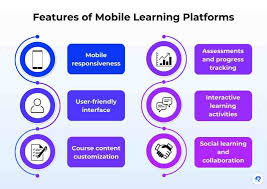
Content Delivery: Shows lessons, videos, and audio files.
Interactive Quizzes: Tests understanding with quick questions.
Progress Tracking: Shows what you have learned and what’s next.
Offline Access: Lets you learn without internet. Download first.
Notifications: Reminds you about new lessons or deadlines.
User-Friendly Interface: Easy to use, even for beginners.
My First Experience with Mobile Learning
I remember when I first tried a mobile learning app for a new skill. I was working a lot of hours back then. Traditional classes felt impossible.
I downloaded an app my company suggested. It had short video lessons and practice drills. I started using it on my bus rides.
At first, I was a bit unsure. Could I really learn this way? The app was simple to use.
I watched videos while the bus moved. I did quick quizzes during my lunch break. It felt strange to learn without a desk.
But soon, I was excited. I was learning more than I thought possible.
Types of Mobile Learning Platforms
There are different kinds of these platforms. Some are for schools. Others are for businesses to train staff.
There are also apps for specific hobbies or skills. Many universities offer their courses through these systems. So do many online learning sites like Coursera or edX.
You might see platforms that are part of a big learning system. Or they can be simple apps for one topic. Some focus on games to teach.
Others use stories. The goal is always to make learning easy and fun on your phone.
Mobile Learning for Business
Employee Training: Companies use it to teach new skills or safety rules.
Onboarding: Helps new hires learn about the company.
Sales Training: Teaches sales teams about products.
Compliance: Ensures staff know important rules.
Skills Updates: Keeps employees current with industry changes.
Who Uses Mobile Learning Platforms?
Many people use these tools. Students use them for schoolwork. Workers use them for job training.
People learning a new language find them useful. Hobbyists use them to learn crafts or music. Anyone who wants to learn something new and needs flexibility can use them.
Parents use them to help kids learn. Lifelong learners use them to keep their minds active. It really is for anyone with a smartphone and a desire to learn.
The reach is very wide. It has opened up education for many.
Benefits of Mobile Learning
One big benefit is flexibility. You can learn when you have free time. This could be waiting in line or during a commute.
It also makes learning more personal. You can focus on what you want to learn. You can go back to lessons you found hard.
It can also be cheaper. Many mobile courses cost less than in-person classes. The convenience is priceless for many.
You learn at your own speed. This helps people who need more time. Or those who learn very quickly.
Benefits at a Glance
Convenience: Learn anywhere, any time.
Flexibility: Fits into your schedule.
Personalization: Learn at your own pace.
Cost-Effectiveness: Often cheaper than traditional methods.
Engagement: Interactive features can make learning fun.
Accessibility: Opens learning to more people.
Challenges of Mobile Learning
Sometimes, small screens make reading long texts hard. Internet access can be a problem in some areas. Also, some people find it hard to stay focused on a phone.
Distractions are everywhere. It takes self-discipline to learn well this way.
The quality of apps can vary. Some are not well-made. They might have bugs or bad content.
It’s important to pick good platforms. Also, not all subjects are easy to teach only on a phone. Hands-on skills can be harder to learn without real practice.
Things to Watch Out For
Screen Size: Can be tiring for long reading.
Internet Issues: Poor signal can stop learning.
Distractions: Phones have many tempting apps.
Self-Discipline: Requires focus and motivation.
App Quality: Not all apps are good.
Subject Limits: Some topics are hard to teach this way.
What to Look For in a Platform
A good platform has clear lessons. The videos should be good quality. Quizzes should be helpful.
Progress tracking should be easy to see. It should work well on your phone. Offline access is a big plus.
Support from the platform is also good.
Think about what you want to learn. Does the platform offer that? Read reviews from other users.
Try a free trial if offered. Make sure it feels easy and fun to use. The best platforms make you want to keep learning.
Choosing the Right Platform
Content Quality: Is the information accurate and well-presented?
User Experience: Is the app or site easy to navigate?
Device Compatibility: Does it work well on your phone or tablet?
Offline Mode: Can you download lessons to study without internet?
Engagement Tools: Does it use quizzes, games, or discussions?
Support: Is there help if you run into problems?
Designing for Mobile Learning
When building these platforms, designers focus on simplicity. Content is broken into small parts. This is called microlearning.
Short videos are common. Text is easy to read. Buttons are big enough to tap.
Navigation is clear and simple.
Responsive design is key. This means the content adjusts to any screen size. Whether you use a small phone or a larger tablet.
Graphics are optimized. They load fast. This makes the whole experience smooth.
It respects the user’s time and device.
Design Principles for Mobile Learning
Bite-Sized Content: Small chunks of information.
Clear Navigation: Easy to find your way around.
Readable Fonts: Text that is easy to see on small screens.
High-Quality Media: Clear videos and images.
Interactive Elements: Quizzes, polls, and games.
Fast Loading: Content that appears quickly.
Real-World Scenarios
Imagine a retail worker. They need to learn about a new product. Instead of a long meeting, they get a short video on their phone.
They watch it before their shift. Or think of a nurse. They need to stay up-to-date on new medical practices.
Mobile apps let them learn on the go between patients.
Construction workers can get safety refreshers right before starting a job. They watch a quick video about a specific tool. This ensures they are prepared.
Even chefs can learn new recipes or techniques via mobile apps. It’s about fitting knowledge into real work and life.
When Is Mobile Learning a Good Fit?
It’s great for learning on the move. If you travel a lot for work, it’s useful. For people with very busy lives, it’s perfect.
It helps with ongoing training. Like learning a new language or a skill for your job. It’s also good for quick refreshers.
Or learning about current events.
It works well for topics that don’t need lots of complex equipment. Or subjects that can be broken into small pieces. Think of learning facts, figures, or basic concepts.
It’s also good for building habits. Like daily practice for math or vocabulary.
When Might It Not Be the Best Choice?
For very complex subjects, it might be tough. Subjects needing deep focus or hands-on labs are harder. For instance, learning surgery might not be best on a phone.
Or advanced engineering. Anything that requires lots of reading or deep, quiet study might be better elsewhere.
If you have a very old phone with a small screen, it might not work well. Or if you live in an area with no good internet. In these cases, other learning methods would be better.
It’s about finding the right tool for the right job.
Mobile Learning vs. Other Methods
Mobile Learning: Best for quick learning, on-the-go, short bursts.
Online Courses (Desktop): Better for long lectures, deep study, complex topics.
In-Person Classes: Ideal for hands-on skills, group discussion, direct feedback.
Books: Good for in-depth reading, reference, quiet study.
Workshops: Excellent for practical, interactive skill-building.
The Future of Mobile Learning
Mobile learning will keep growing. We will see more apps use AI. These will make learning more personal.
They will adapt to how you learn best. Virtual reality and augmented reality might play bigger roles. Imagine learning about history by walking through a virtual past.
More companies will use it for training. Schools will use it to help students outside class. It will become even more common.
The devices we use will get better. This will make mobile learning even more powerful. It’s an exciting time for education on the go.
Frequently Asked Questions about Mobile Learning Platforms
Is mobile learning effective for all subjects?
Mobile learning is very effective for many subjects, especially those that can be broken into small, digestible pieces. Think language learning, basic math, historical facts, or job-specific procedures. For highly complex, hands-on, or abstract subjects, it might be better combined with other learning methods.
Can I learn a new language using a mobile platform?
Yes, absolutely! Many popular language learning apps are mobile platforms. They use flashcards, short lessons, pronunciation practice, and quizzes.
This makes learning a language very convenient and accessible on your phone.
What is the difference between a mobile app and a mobile website for learning?
A mobile app is software you download and install on your device. It often offers more features and can work offline. A mobile website is a version of a website that is designed to look good and work well on mobile screens.
You access it through your phone’s browser.
How do I ensure I stay focused when learning on my phone?
Try to find a quiet place to study. Turn off notifications for other apps while you are learning. Set a timer for your study sessions.
Take short breaks. Focus on one lesson at a time. Treat it like a real study session.
Are mobile learning platforms expensive?
The cost varies a lot. Some platforms are free, especially those for basic education or with ads. Many offer subscriptions or one-time payments for full access.
Business or university platforms are often paid for by the institution. Compared to traditional education, they can often be more affordable.
What does “offline access” mean for mobile learning?
Offline access means you can download course materials, videos, or lessons onto your phone or tablet. You can then study them even when you don’t have an internet connection. This is great for commutes, flights, or areas with poor Wi-Fi.
You usually need to download content when you do have internet.
How can I tell if a mobile learning platform is high quality?
Look for platforms with clear learning objectives. Check for well-made videos and audio. Test the quizzes to see if they are helpful.
Read reviews from other users. A good platform will be easy to navigate and have helpful customer support if you need it.
Conclusion
Mobile learning platforms are a powerful tool for modern education. They bring learning to your fingertips. With flexibility and convenience, they fit into many lives.
Choosing the right platform and using it well can truly boost your knowledge and skills.